
Almost every WordPress security plugin works the same way underneath: something bad appears in the world, a researcher takes it apart, a signature or a firewall rule is written, and from that moment your site can block it. That works — and it is genuinely useful — but it leaves a window. Between “this attack exists” and “your plugin knows about it”, the attack wins.
When we started building Must-Have Security, we did not want to ship another signature database. We wanted to close that window — not by recognising malware faster, but by making the thing malware needs to do impossible in the first place.
Two rules do most of the work, and both of them sound almost too simple: nothing writes executable code unless a human just said so, and nothing gets executed by name unless it is supposed to be an entry point. This post explains why those two rules cover so much ground.
Every persistent attack has one step in common
Think about what an attacker actually has to achieve. They find a vulnerable plugin, they get some code to run — and then what? A single request that runs and ends is nearly worthless to them. To keep the site, to come back tomorrow, to sell the access on, they need something that persists. In practice that means a file: a webshell in uploads, a backdoor appended to functions.php, a fake must-use plugin, a poisoned drop-in.
Sooner or later, the code has to become a file. That step is the same whether the malware is ten years old and in every signature database, or was compiled an hour ago and has never been seen by anyone.
So that is the step we watch. Must-Have Security does not ask “do I recognise this payload?” It asks “is anything on this site currently allowed to create executable code?” — and the default answer is no.
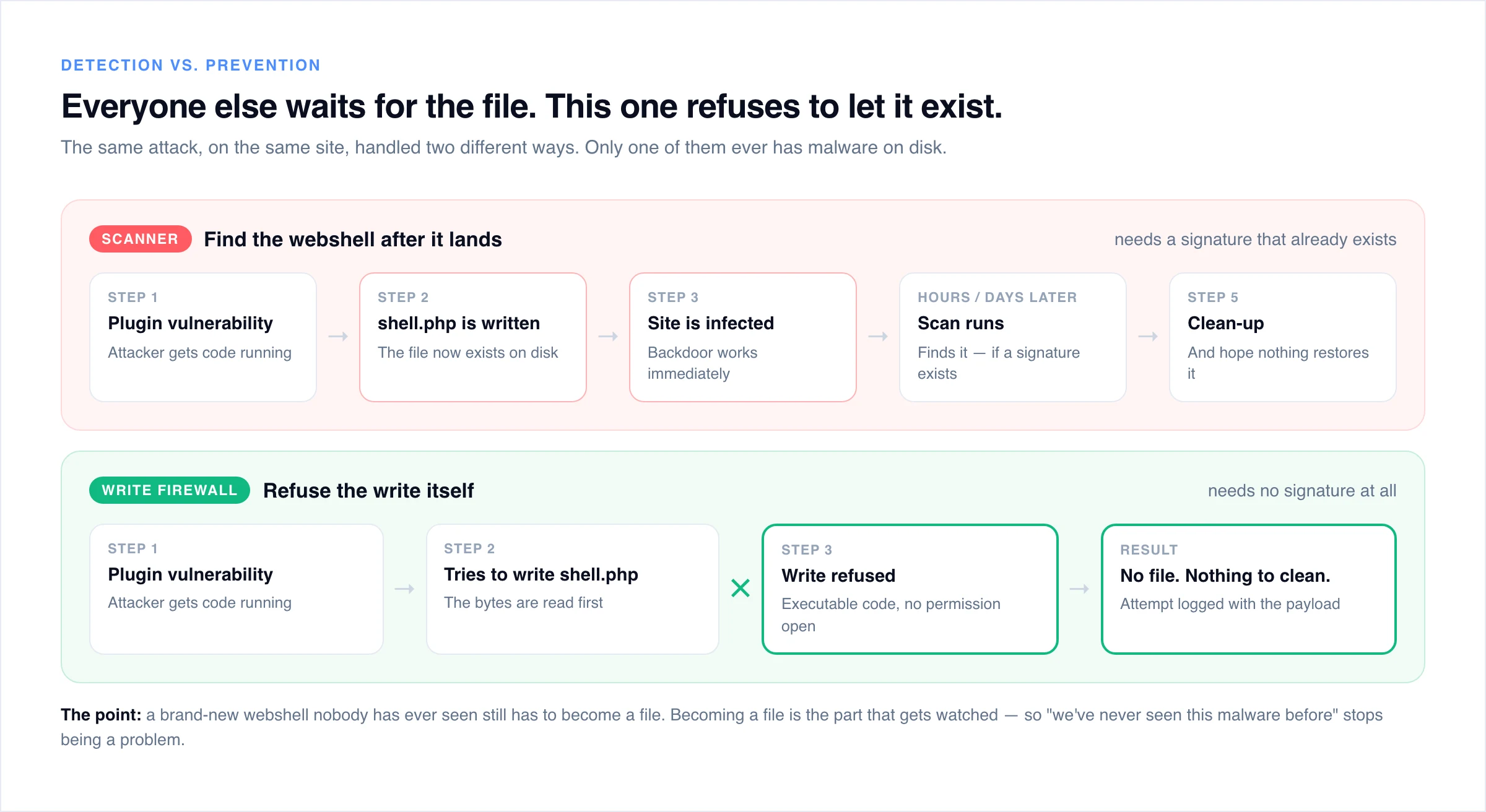
This is the part people find counter-intuitive at first: we do not need to know what the malware is called. A brand-new webshell with no signature anywhere on earth still has to arrive as bytes, and those bytes still have to be written somewhere. Refuse the write and the rest of the attack has nowhere to live.
The second half: running before WordPress
Here is a detail that surprises a lot of experienced WordPress people. When someone requests a dropped backdoor directly — yoursite.com/wp-content/uploads/2026/09/invoice.php — WordPress does not load at all. PHP executes that file and only that file. Every security plugin you have installed is code inside WordPress, and none of it runs for that request. It is not that they miss it; they are not there.
Must-Have Security gets around this using a mechanism PHP has had for decades: auto_prepend_file, which runs a chosen file before every PHP request on the site. No server module, no daemon, no root access — it works on ordinary shared hosting. The engine starts first, every time, whether the request is going to WordPress or not.
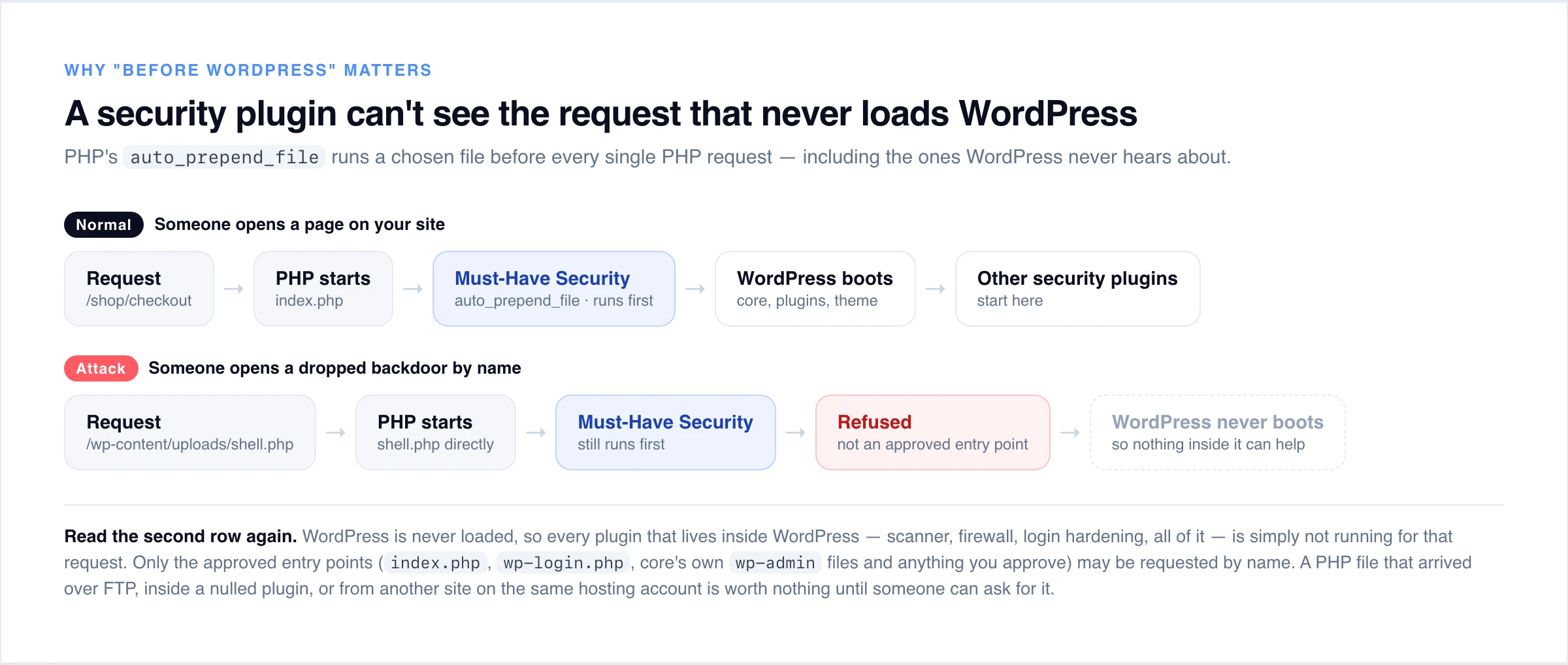
Once you are running that early, you can answer a question nothing else is in a position to answer: which PHP files on this site may be requested by name at all?
The honest answer for a normal WordPress site is a short list. index.php, wp-login.php, wp-cron.php, the real files inside wp-admin that ship with core — and whatever specific endpoints your plugins genuinely need, which you approve once. Nothing else has any business being loaded directly. So the direct-request layer refuses everything else, and suddenly a whole class of problems stops mattering: a backdoor hidden inside a nulled plugin, a file uploaded over stolen FTP credentials, an infection spreading from the neighbouring site on the same hosting account. The file may exist. It just cannot be reached.
(For wp-admin we do not simply trust the folder, because trusting a folder is the same as not checking. The allowed list is built from the official WordPress checksums for your exact version and language, so a dropped wp-admin/evil.php is refused even though it sits among core files.)
How one write gets judged
“Block executable files” sounds easy until you remember that an extension proves nothing. A file called notes.txt runs perfectly well as PHP the moment something includes it, and logo.php.jpg is executed as PHP by plenty of real server configurations.
So the engine checks the name properly — every dotted segment, not just the last one — and then it reads the bytes on the way past. The content check is deliberately two-stage, because false positives are how security tools get uninstalled: first a fast scan for an opening <? tag, and only if one is found, a look at the surrounding window for something genuinely dangerous — eval, base64_decode, shell_exec, $_POST, php://input. Plugin documentation containing <?php is fine. <?php sitting next to eval($_POST[…]) is not documentation.
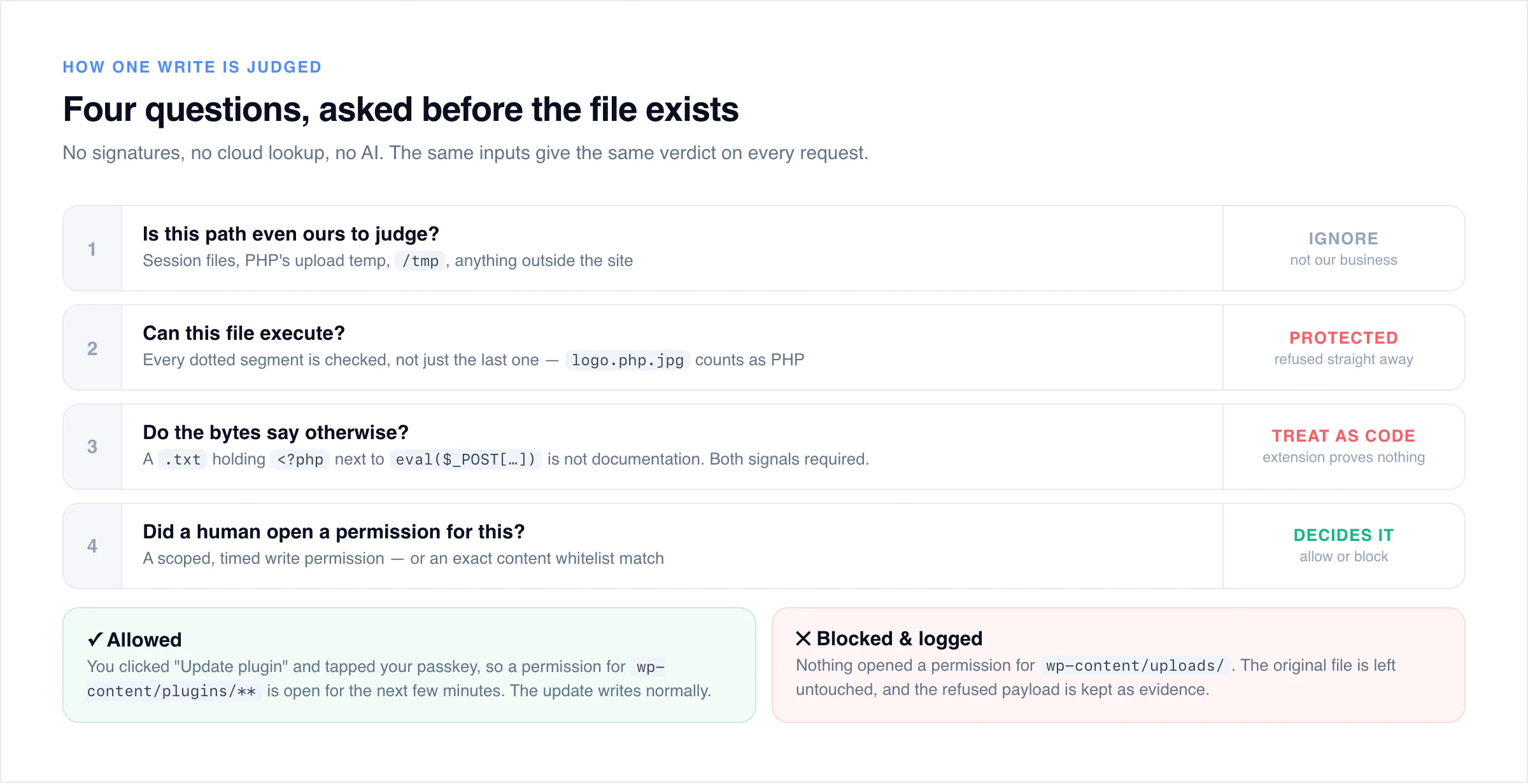
One implementation detail worth mentioning, because it is the difference between a security feature and an outage: when a write is refused, the file that was already there is left exactly as it was. Opening a file in write mode normally empties it immediately, before a single byte of the replacement arrives — block the write at that point and you have handed the site an empty functions.php, which is worse than the attack. The engine opens inspected targets without truncating and only commits once the content has passed.
But WordPress legitimately writes PHP files
Of course it does. Plugin installs, theme updates, core updates, translations — all of them write executable code, and a protection that simply makes everything read-only would break your site’s ability to keep itself patched, which is its own security disaster.
The answer is not to make an exception for administrators. And this is the part we would most like people to take away from the post, even if they never install our plugin:
The administrator role lives in your database. An SQL injection can create one. So “this request is from an administrator” cannot be the reason a PHP file is allowed to be written — otherwise SQL injection is, in effect, remote code execution.
Instead there is a separate list of trusted administrators, kept outside the database in a file the engine protects like its own. Being on that list is not permission to write code — it is permission to ask for permission. When you click “Update plugin”, you tap a passkey or enter a code from your authenticator app, and a write permission opens: scoped to wp-content/plugins/**, alive for a few minutes, tied to your session. The update runs normally. When it expires, the door closes.
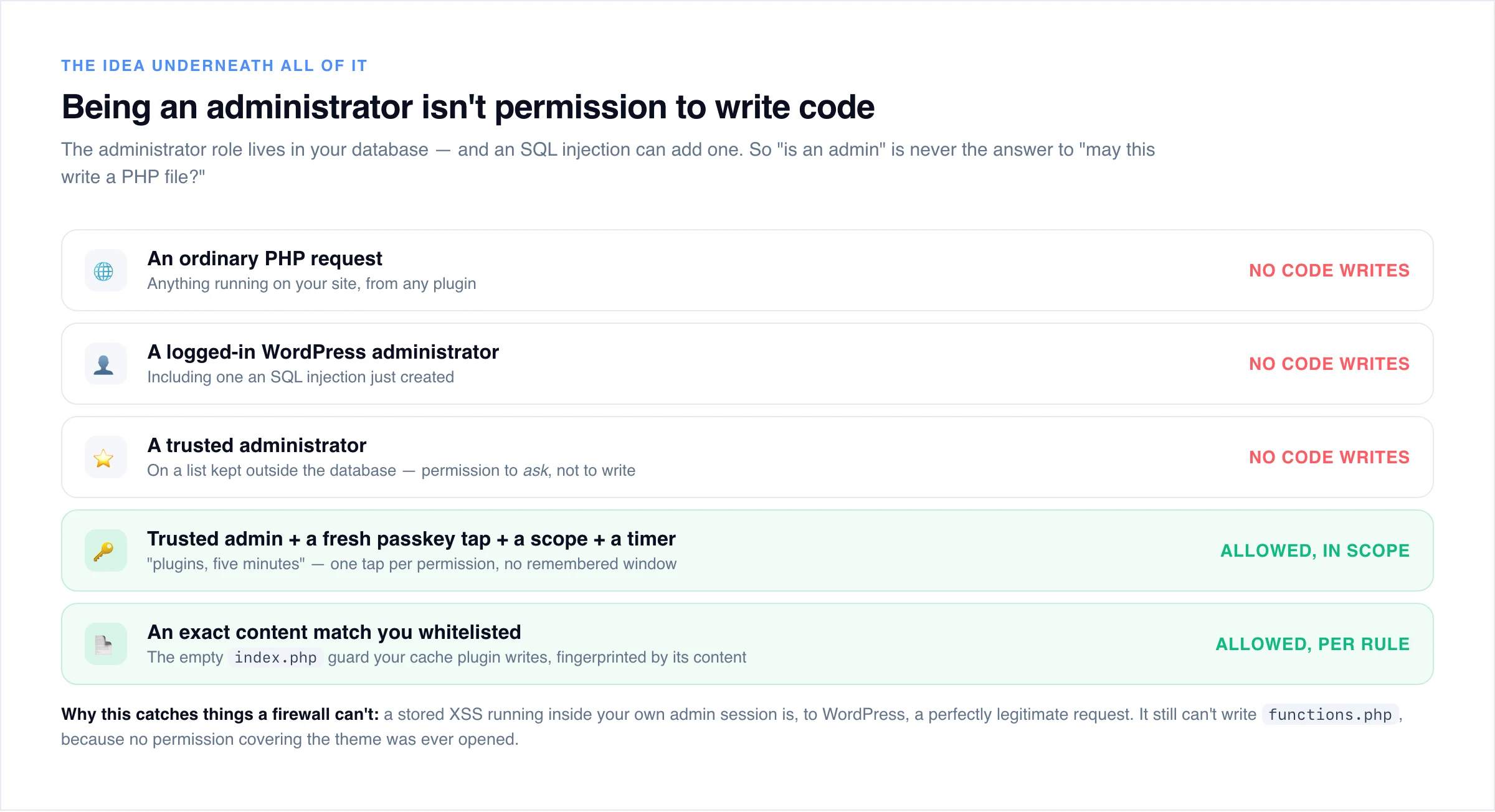
Proving your identity never opens a window, by design. Every permission costs a fresh tap. That sounds slightly annoying — installing four plugins is four taps — and it is exactly the point: a stored XSS running in your admin session does not need to steal your passkey, it just needs your passkey to have been used recently. With no window, there is nothing for it to ride on. The authenticator is in your pocket, and the malicious request waits for a tap that never comes.
For the writes that no human is ever involved in — a cache plugin dropping an .htaccess, the empty index.php guards half the ecosystem creates — there is a whitelist, and it works on content, never on a location. The file is normalised, its fingerprint stored, and every future write of that exact content is allowed anywhere. The same file with one extra statement appended has a different fingerprint and is covered by nothing.
Why this matters right now: self-healing malware
The infections that are currently giving cleanup specialists the most trouble are the ones that rebuild themselves. You delete the malicious file, and it is back seconds later — restored by a drop-in, a must-use plugin, an injected theme block, a copy in the database, or a .user.ini directive you did not notice. Remove one component and another recreates it.
Notice what every one of those recovery paths has to do to succeed: write an executable file. That is the whole mechanism. If executable writes require a permission that no automated process can hold, the malware cannot restore itself — not because we recognised it, but because the operation it depends on is refused. Deleting a file finally means something.
It is a genuinely different place to stand than an external firewall. A WAF in front of your site is good at what it sees — SQL injection attempts, obvious XSS, known exploit patterns — and we run one too. But consider a real category of bug: a plugin with a missing authorisation check lets any logged-in user (a customer who just made an order, say) modify an option, and that option is written into a PHP file as a string without being sanitised. Close the string, append your own code, and you have remote code execution through a request that looks completely ordinary. No firewall rule exists for that until the vulnerability is public. Write control does not need one — the exploit still ends at “create a PHP file”, and that is refused.
What is actually left of remote code execution
It is worth being precise here, because “it blocks file writes” sounds narrower than it is. Ask how an attacker actually reaches code execution on a WordPress site, and almost every route in real use goes through the same door:
- Upload a PHP file and request it. The write is refused — and even if the file reached the disk some other way, it is not an approved entry point, so it cannot be requested by name.
- Append code to a file that already gets included —
functions.php, a drop-in, a generated cache config. That is a write, judged by its bytes. - Install a malicious plugin or theme through a broken authorisation check. That is writing executable files in bulk, with no permission open.
- SQL injection that can write a file straight from the database engine, bypassing PHP entirely. The file may well land — and then nothing on earth may request it.
- A local file inclusion pointed at an “image” with PHP inside it. The upload gate reads the bytes before WordPress ever moves the file into place.
What is left over is the genuinely rare material: a plugin that hands user input to eval(), a deserialisation gadget chain that reaches a function call without touching the filesystem, or command injection into exec(). Those exist, and we are not going to pretend a category of software cannot be attacked. But they are a thin slice of a vulnerability feed dominated by arbitrary file upload, authorisation bypass and privilege escalation — and every one of those, at the moment it turns into something the attacker can keep, becomes a file write. For practical purposes, taking away the write takes away remote code execution.
That matters more than it did a few years ago, because the timeline has collapsed. Patchstack’s State of WordPress Security in 2026 puts the median time from disclosure to mass exploitation at five hours, and found that 46% of vulnerabilities disclosed in 2025 had no fix available from the developer when they went public. Patching faster is not a strategy you can win on when the fix does not exist yet.
Nor does the layer in front help as much as people assume. In Patchstack’s own penetration tests of common defences — host WAFs, Cloudflare and similar — only 12% of WordPress-specific vulnerability attacks were blocked, rising to 26% across a broader set. Their most-exploited category was broken access control, which they point out is hard for a WAF precisely because the exploit looks like ordinary authenticated traffic with no injection pattern to match. Write control never has to tell the difference. Authenticated or not, recognised or not, no permission was open, so the file is not written.
It starts by watching, and it tells you where it can’t help
A security plugin that locks you out of the screen where you would turn it off has failed, no matter what it caught on the way. So Must-Have Security enforces from the first request, but everything that could stand between you and your admin is built to fail toward letting people in: an address a trusted admin has used is never refused, no firewall rule can block the admin or the login screen, and if the engine itself ever fatals it switches itself off. If you would rather watch first, switch it to monitor mode: every write is evaluated and recorded with its full payload, and nothing is blocked, so you see precisely what enforcement would do on your real site, with your real plugins. (If you have ever had to recover a site with wp-admin unreachable, you will understand why we were careful here.)
We are also specific about the gaps, because hiding them would be worse than having them. Files written by a separate process — through exec(), shell_exec() or proc_open() — never pass through the engine at all, so if you don’t need them, switch them off in php.ini. Code that has already reached execution inside a request can unregister the protection in one call, so this is a layer that prevents an attacker getting there, not one that saves you afterwards. The documentation lists each of these gaps with its mitigation.
And the rest of the plugin
Everything above is the preventive half, and it is the half we think is genuinely new. The rest is the toolkit you would expect, built to the same standard. There is a request firewall that runs before WordPress too, with an attack-request classifier, optional AI-crawler blocking and a country lookup for every event, plus cron and database monitoring — because an attacker whose file write was refused will try a scheduled task or a direct SQL write next, and both are reported with the evidence attached.
For everything that was already on disk before you installed anything, there is a malware scanner — the detective half. Core is verified against the official WordPress checksums; everything else is read as code by a classifier that follows request input through the file, so a file with no backdoor mechanism reachable from any input is cleared without leaving your server. Only the small remainder that genuinely cannot be decided — under 1% of files on a typical site — is sent for AI analysis. It flags findings with the evidence in front of you; it never deletes on its own. And on the access side, the trusted-admin system brings passkeys and authenticator apps into the part of WordPress that matters most, which pairs naturally with how we think about logging in beyond the password and handing out temporary admin access.
The takeaway
Reactive security will always be one step behind, because that is what reactive means — and with five hours from disclosure to mass exploitation, “behind” is now measured in a working day. The alternative is not a better signature database. It is removing the capability the attack depends on: executable code should not be writable by default, and PHP files that are not entry points should not be executable by name. Neither of those requires knowing what the attack looks like, and together they close the door that nearly every real remote-code-execution chain has to walk through.
If you want to see it working rather than read about it, there is a full walkthrough on YouTube — a live upload with a payload inside, monitor mode showing exactly what enforcement would do, and a scoped permission opening for a real plugin update. The documentation goes deeper into the loader, the policy and the permission model, and the product page has the rest.
And if you are currently choosing a security plugin, our comparison of Wordfence alternatives is a fair place to start — including the honest note that most of them, ours included, are solving different parts of the same problem.