

Every WordPress site needs a backup. That part is easy to agree with and easy to postpone, because the question that actually decides whether you are protected is not whether you back up — it is how far back you can go, how precisely, and how quickly you can prove it works.
There are four realistic ways to back up WordPress. Here is what each one actually gives you, and where each one leaves a gap.
The number that matters: how much work can you afford to lose?
Backup people call this the recovery point objective — the gap between your last good copy and the moment things went wrong. Everything in that gap is gone.
A nightly backup means up to 24 hours of loss. On a blog that might be one post. On a shop it is a day of orders, customer accounts and stock levels — and unlike a post, you cannot rewrite those from memory. This is the single number to hold in your head while reading the options below.
Option 1: Hosting provider backups
Most decent hosts take a daily snapshot of your account. It costs nothing extra, it needs no setup, and for a small site that rarely changes it is genuinely better than nothing.
The limits show up when you need it. The copy usually lives on the same infrastructure as the site, so an account suspension or a provider-side incident can take both. Retention is often seven to thirty days. Restores are typically all-or-nothing: you roll the whole account back to yesterday, which also rolls back everything good that happened since. And you cannot test a restore without disrupting the live site, so most people never test one.
Use it as: your safety net of last resort, not your plan.
Option 2: Manual backups with cPanel, FTP or phpMyAdmin
Download wp-content over FTP, export the database from phpMyAdmin, keep the files somewhere safe. It is free, it is completely under your control, and it is a genuinely useful skill before a risky change.
As a routine, it fails for a human reason: it depends on you remembering. It is also easy to get subtly wrong — a phpMyAdmin export that times out halfway produces a file that looks fine and restores into a broken site. Large sites make it worse, because a multi-gigabyte wp-content over FTP is an afternoon.
Use it as: a deliberate pre-change snapshot, never as the schedule.
Option 3: Scheduled backup plugins
The familiar model: pick a frequency, pick a destination, the plugin packages the site and ships it off. This is a real improvement — it runs without you, it puts a copy somewhere other than the server, and restores are usually one button.
Two limits are built into the design. The first is that you are restoring to a scheduled moment, so everything after it is lost. The second is cost: because each run re-packages the site, running it hourly on a large site means repeatedly compressing and uploading gigabytes that did not change. So people set it to daily, and accept the 24-hour gap.
Use it as: a solid baseline for sites that change a few times a week.
Option 4: Continuous point-in-time backup
The fourth approach removes the schedule from the equation. Instead of packaging the site every so often, it takes periodic full snapshots and then records every database write and file change in between. Recovery is not “restore Tuesday’s backup” — it is “put the site back to 14:32, just before the import ran”.
This is how Must-Have Backup works, and rather than describe it, here is the plugin running on our own demo site:
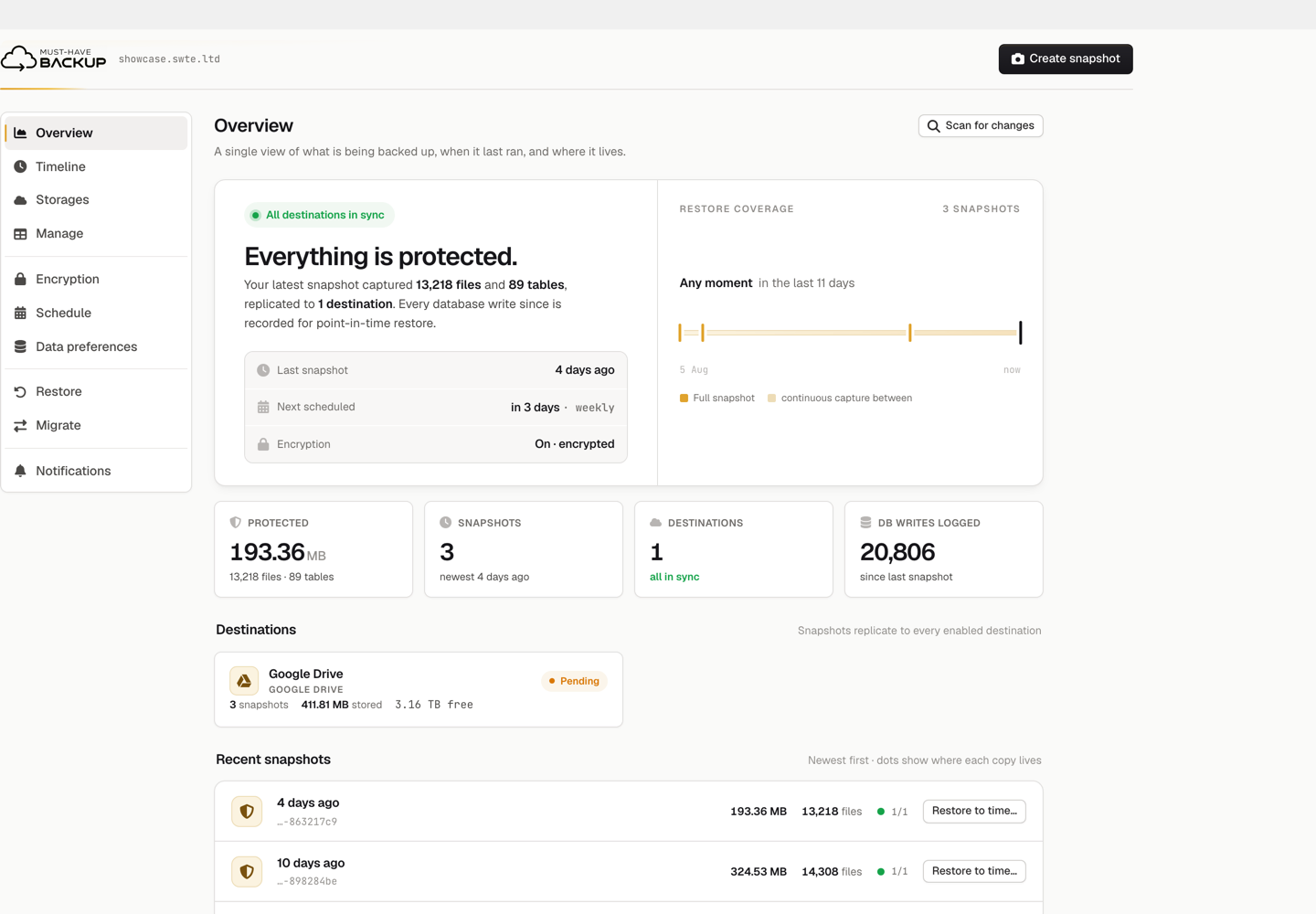
Three numbers on that screen are worth pulling out, because they are the whole argument:
- Restore coverage: any moment in the last 11 days. Not three restore points — any moment between them.
- 20,806 database writes logged since the last snapshot. That is the work a nightly backup would have been quietly discarding.
- Three snapshots, 411.81 MB stored off-site. The protected site is 193.36 MB across 13,218 files and 89 tables, so eleven days of history cost roughly two copies — not three.
That last point is what makes the approach practical rather than merely appealing, so we measured it. We took two consecutive full snapshots of the site with nothing changed in between:
- Each snapshot completed in 9 seconds — 13,000 files and 89 tables, encrypted.
- The first added 57 files to the backup store. The second added 6. Out of thirteen thousand.
That is the whole economic argument for the model. A traditional plugin re-packages and re-uploads the site every run, which is why nobody schedules it hourly. Here, a repeat snapshot of unchanged content stores essentially nothing, so taking them often costs almost nothing. Version 0.3.0 sharpened this further with deterministic database dumps, and backup chunks are now compressed on disk and at every destination, with syncing reading bundle indexes from small sidecar files instead of pulling whole bundles back down.
The same release did unglamorous but important work on the restore path — the part nobody tests until the worst day. Restores no longer fail on a duplicate-key row in a busy non-InnoDB table; rollback no longer gets stuck on a wp-content folder it cannot move, such as a bind mount or root-owned mu-plugins; each folder is moved out and back as a pair, so a failure can affect one folder at most and never empties wp-content; maintenance mode no longer expires mid-operation; and if WordPress empties the active-plugin list while files are moving, rollback puts it back.
One upgrade note: existing backups stay restorable, and the first snapshot after updating re-uploads the database once. Download a fresh Recovery Kit though — older kits cannot read the new compressed backups.
The four options side by side
| Host backups | Manual | Scheduled plugin | Continuous | |
|---|---|---|---|---|
| Runs without you | yes | no | yes | yes |
| Worst-case data loss | up to 24 h | since you last remembered | up to the interval | seconds |
| Restore to an exact moment | no | no | no | yes |
| Stored away from the server | usually not | if you move it | yes | yes |
| Cost of frequent copies | n/a | your time | re-packages everything | only the changes |
| Restore without touching live | no | no | varies | staged, then swapped |
Which method is right for you?
A brochure site that changes monthly
Host backups plus a manual copy before any big change is defensible. Losing a day costs you almost nothing, because almost nothing happened that day. Do check your host’s retention window and confirm you can actually trigger a restore yourself.
A business site or blog publishing weekly
A scheduled plugin writing to storage you control is the sensible baseline. Keep the host backups as a second line. The thing to get right here is not frequency but off-site: a backup on the same server is not a backup.
A shop, a membership site, or anything with user-generated content
This is where scheduled backups stop being adequate, and the reason is arithmetic rather than opinion. Our modest demo site logged 20,806 database writes between two snapshots. On a real shop those writes are orders, payments, stock movements and customer records. A nightly backup does not lose “a day” — it loses every transaction in that day, and you have no list of what they were.
If a bad hour would mean reconstructing orders from payment-processor emails, you need point-in-time recovery.
Whichever you choose, do these three things
- Get a copy off the server. The failure modes that destroy sites — a compromised account, a suspended host, a bad disk — take everything stored alongside them.
- Encrypt it. A backup is a complete copy of your database: customer names, addresses, order history, password hashes. Wherever it lands, it should be unreadable without your key.
- Restore one, on purpose, before you need to. An untested backup is a hypothesis. Restore into a staging copy and click around. This is the step everyone skips and the step that decides whether the rest mattered.
Frequently asked questions
How often should I back up WordPress?
As often as you would mind losing the work. A site that publishes monthly is fine with daily backups; a shop taking orders every hour is not, because a daily backup can discard a day of transactions. Rather than picking a frequency, decide how much loss is acceptable and choose a method that meets it.
Are my host’s backups enough?
For a low-change site they can be. Check three things: how long they are kept, whether they are stored away from your account, and whether you can restore one yourself without opening a ticket. If any answer is unsatisfying, treat them as a fallback rather than your backup plan.
What is point-in-time restore?
Recovering the site to an arbitrary moment rather than to a scheduled backup. It works by combining periodic full snapshots with a continuous record of every change in between, so you can roll back to just before a bad import, a broken update or a hostile login — keeping everything that happened up to that second.
Does continuous backup slow the site down?
Change capture is designed to be cheap because it records changes rather than re-packaging the site. The expensive part of traditional backups is the repeated full copy, which is exactly what this model avoids — and with deterministic dumps, a snapshot of a site that has not changed stores essentially nothing.
Take-home message
Backups are not really about copying files. They are about the gap between your last good copy and the moment you needed it, and about whether you have ever proved that copy works.
Host backups shrink that gap to a day and keep the copy uncomfortably close. Manual backups shrink it to whenever you last remembered. Scheduled plugins shrink it to your interval, and charge you a full re-upload for every reduction. Continuous point-in-time backup shrinks it to seconds and only pays for what changed.
Pick the one that matches what a bad hour would actually cost you — and then go and restore something, today, while it is not an emergency. The Must-Have Backup documentation walks through a restore drill if you want somewhere to start.


